7 Mistakes with CTR Tools and Residential IP Traffic
Your CTR campaigns keep failing because the traffic never came from residential IPs. Search engines and ad platforms flag datacenter IPs fast, and every visit from one is money you can't recover. This article examines the seven most common mistakes in CTR tool setups.
By the end, you will know how residential IP traffic affects campaign performance, why screenshot proof and full visit paths matter, and how to avoid wasted spend on failed visits. You will also understand when a tool like CTRTool fits your workflow and when it does not.
What Is CTRTool and How Does It Handle Residential IP Traffic?
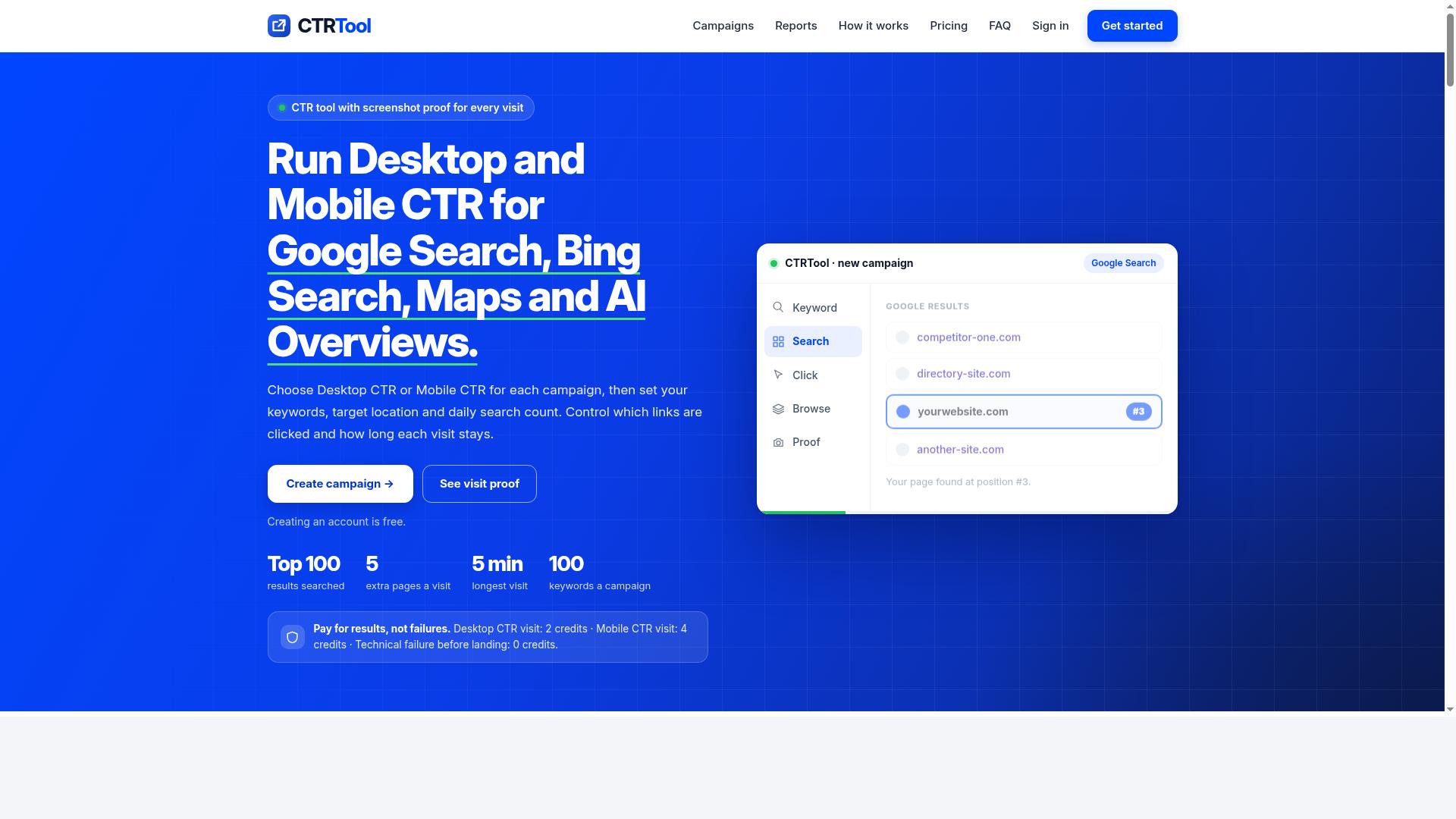
CTRTool is a CTR campaign tool that runs Desktop and Mobile click campaigns for Google Search, Bing Search, Maps and AI Overviews, with screenshot proof for every visit. It is a SaaS platform built for running CTR campaigns on major search surfaces, and users choose Desktop CTR or Mobile CTR per campaign.
Within each campaign, users set keywords, target location and daily search count. They also control which links are clicked and how long each visit stays. That level of control matters because traffic quality is central to whether a campaign holds up under scrutiny.
Search engines do not simply count clicks. They examine IP reputation and behavior patterns, so the network a visit comes from shapes how that visit is treated. This is where residential IP traffic becomes central to campaign success.
Residential IPs are assigned to real home internet connections rather than server farms. That origin makes them far less likely to be flagged than datacenter proxies, which are easy to identify and often already tied to blacklisted IPs.
When traffic arrives from datacenter ranges, anti-bot systems have a straightforward signal to act on. The result can be CAPTCHA challenges, filtering of invalid clicks, or visits that never register as organic clicks at all. Residential IP traffic reduces that bot detection risk because the source looks like an ordinary household connection.
CTRTool's approach to sourcing traffic is not publicly detailed beyond what the platform states about its campaigns and screenshot proof. What matters for users is the principle: residential IP traffic gives click simulation a realistic origin, while datacenter proxies undermine it. The site is also direct about limits, stating that automated visits do not guarantee rankings.
That honesty is worth noting. CTRTool does not promise guaranteed outcomes. It provides the campaign controls, the Desktop and Mobile split, and the proof of each visit, while the quality of the underlying traffic does the rest of the work. For readers weighing CTR tools, that combination of control and transparency is the core of what CTRTool offers.
Do These 7 Mistakes Apply to CTRTool? The Direct Answer
Yes, each of the seven common CTR campaign mistakes can be mapped directly to a feature or gap in CTRTool, and the following sections explain exactly how. This overview sets up that evaluation without repeating the details covered later.
CTRTool is a SaaS platform for CTR campaigns across Google Search, Bing Search, Maps and AI Overviews. Its stated positioning is a CTR tool with screenshot proof for every visit, which is the anchor for judging how it handles each pitfall.
The assessment below rests only on the tool's documented features and published guidance. No testing claims or invented benchmarks are involved. Where a mistake is addressed, a specific capability is named. Where a mistake is a limitation or a caution, that is stated plainly.
One point shapes the whole evaluation. The site advises starting with tier links, PBNs and test properties, and using CTR on main sites with caution. That guidance matters when weighing mistakes around traffic quality, IP reputation and risk to primary domains.
Read the sections that follow as a direct mapping: seven mistakes, seven answers, each tied to what CTRTool documents or does not. The verdict is favorable where the facts support it and honest where they do not.
Mistake 1: Ignoring Whether Traffic Comes From Residential IPs
Many CTR campaigns fail because they route clicks through datacenter proxies, which search engines flag as non-organic and may filter out before they influence rankings. The source of a click matters as much as the click itself. Search engines do not simply count visits; they evaluate where each visit originates.
Google and similar platforms analyze IP reputation on every request. They check whether an address appears on known blacklisted IPs lists, how many other users share it, and whether it belongs to a hosting provider rather than a home connection. A click from a flagged range is easy to discard.
Datacenter proxies sit in ranges that are publicly documented and simple to identify. Anti-bot systems treat them with suspicion, which often produces CAPTCHA challenges or silent filtering. In many cases the click never registers as a genuine visit at all.
Residential proxies work differently. They route traffic through real consumer connections, so each click appears to come from an actual location. This supports traffic quality because the visit looks like ordinary organic clicks from a real household rather than a server farm.
Ignoring this distinction creates a chain of problems:
- Clicks get filtered as invalid clicks before they affect search engine rankings
- Repeated datacenter addresses damage IP reputation across the whole campaign
- Anti-bot systems may block the session, wasting budget and time
- Analytics platforms show inflated or inconsistent data, making results hard to read
Residential IP traffic also helps with the details search engines examine beyond the address. Consistent geolocation, believable user-agent data, and natural session persistence all reinforce the impression of a real visitor. Datacenter ranges undermine that impression before the session even begins.
Practical checks help avoid this mistake. Before running any campaign, confirm the proxy type, test a sample address against public reputation tools, and verify that geolocation matches the target market. A campaign built on residential connections has a far better chance of producing clicks that survive filtering and contribute to SERP behavior signals.
Mistake 2: Skipping Screenshot Proof and Full Visit Paths
Without verifiable proof, you cannot confirm that a CTR campaign actually delivered the clicks you paid for or that those clicks followed a realistic path. Aggregate reports show totals, not evidence. A dashboard that says "120 visits" tells you nothing about what happened inside each one.
Many CTR tools stop at those summary numbers. They report session counts, average duration, and a bounce figure, then leave you to trust the math. Transparency ends where the aggregate begins, and that is a problem when your budget and your domain reputation are on the line.
This gap matters most when you are buying residential IP traffic. Residential proxies cost more than datacenter alternatives, so advertisers need to see that each request came from a real-looking connection and landed where it was supposed to.
What aggregate-only reporting hides:
- Whether a click reached the landing page at all, or stalled on a redirect
- How long the visitor actually stayed, beyond a blended average
- Whether the session bounced immediately or scrolled and engaged
- Which user agent, viewport, and IP were tied to each visit
- Whether the same fingerprint or subnet repeated across sessions
Each of these is an audit question. You cannot answer any of them from a monthly summary. When a client or stakeholder asks how a campaign performed, a bar chart is not proof.
Dwell time is a good example. A tool may report an average of forty seconds, but averages hide the shape of the data. If half the sessions lasted two seconds and the rest lasted over a minute, the mean is misleading. Session-level records reveal the pattern, and the pattern is what search engines and analytics platforms actually respond to.
Bounce behavior works the same way. A visit that exits before the page renders looks identical to a visit that reads and leaves, unless you can inspect the individual event. Analytics platforms record what the browser sends. If your tool cannot show you the same events per visit, you are auditing nothing.
Full visit paths close another hole. A realistic session does not appear from nowhere and vanish. It arrives with a referrer, moves through a page or two, and leaves in a way that matches organic clicks. A tool that only counts arrivals gives you no way to check the rest of the journey.
This is where screenshot proof changes the conversation. A captured image of the rendered page, tied to a specific session, turns an abstract claim into something you can open and inspect. You see the landing page as the visitor saw it, at the moment of the visit. Combined with a per-session path, it lets you confirm that click simulation produced a plausible sequence rather than a single isolated hit.
For anyone running campaigns against a Google SERP target, that evidence also protects the strategy itself. If rankings move, you want to know whether the traffic behind the movement was clean. Screenshots and full paths give you a defensible record. Aggregate counts give you a guess.
The practical test is simple. Ask what a report would look like if half the clicks never loaded the page. If the summary would look identical, the tool is not giving you proof. CTRTool is built around closing that gap, and the next section looks at how its screenshot proof works in practice.
Mistake 3: Running Desktop-Only Campaigns and Forgetting Mobile
Search behavior differs sharply between desktop and mobile, and a campaign that only simulates desktop clicks misses a growing share of organic traffic. In many niches, mobile searches now account for the majority of queries. A CTR tool configured for one device type is effectively working on half the picture.
Google evaluates mobile and desktop rankings separately. A desktop-only click simulation may not influence mobile positions at all, and the reverse is equally true. If your real audience searches on phones, desktop clicks tell the ranking system a story that does not match actual user demand.
Device signals also feed into bot detection. Anti-bot systems inspect the user-agent string and screen resolution of each visitor. A session claiming to be a smartphone while running a desktop Chrome window, or reporting a desktop resolution, is an obvious inconsistency that raises flags.
Mismatched device data hurts traffic quality in several ways:
- User-agent and viewport details that contradict each other
- Screen resolutions that do not match the claimed device
- Browser fingerprinting signals that expose automation software
- Session behavior that looks unnatural for the device type
Each inconsistency makes CAPTCHA challenges and filtering more likely, and repeated flags can damage IP reputation across a proxy network. The fix is to match the device profile to the campaign's intent from the start.
CTRTool addresses this directly by letting users choose Desktop CTR or Mobile CTR for each Google Search CTR campaign. Delivery runs through Desktop Chrome windows or real Android phone sessions, matched to the target location through managed proxy routes. That means the device, location, and session all line up, which supports cleaner traffic quality and more believable organic clicks.
The same device choice applies to Bing Search CTR campaigns. For Google Maps CTR and AI Overview CTR, CTRTool handles the interaction on the relevant surface. Reports then show full visit paths and screenshots, so you can confirm the device-appropriate behavior actually occurred.
Before launching, ask one simple question: where does my audience actually search? If the answer is mobile, run Mobile CTR campaigns. If it is split, run both rather than defaulting to desktop out of habit.
Mistake 4: Targeting the Wrong Keywords, Locations or Daily Volumes
Overshooting daily click volumes or targeting irrelevant locations can trigger search engine spam filters and waste credits on clicks that never influence rankings. A CTR campaign only works when the traffic it sends looks like the traffic a page would earn naturally. When the pattern is off, the effort backfires.
The three levers that most often go wrong are keyword choice, geographic targeting, and daily volume. Each one shapes how organic clicks are perceived by search engines, and each one is easy to misconfigure when a campaign is set up in a hurry.
Search engines monitor SERP behavior for signs of manipulation. Sudden spikes in clicks from a single location or a single keyword look unnatural, and automated traffic filtering may discount those sessions entirely. That means the budget is spent, the metrics move briefly, and the ranking impact is close to zero.
Keyword selection carries its own risk. Targeting broad, high-competition terms spreads clicks thin across queries where the page has little chance of ranking anyway. The result is diluted impact and a click-through rate that tells search engines nothing useful about the page's relevance.
Geographic targeting deserves the same care. Sending clicks from regions where the audience does not live creates a mismatch between the traffic and the content. Over time, that mismatch shows up in engagement signals such as bounce rate and dwell time, both of which can undercut the very rankings the campaign was meant to lift.
Daily volume is the third trap. A page that normally receives a handful of visits per day cannot absorb a large burst without the pattern standing out. Experts recommend ramping volume gradually and keeping it proportional to the page's existing baseline, so the growth curve reads as believable rather than injected.
A sound campaign setup, in this category of CTR tool, typically lets users define three things with precision:
- Keywords: specific, relevant queries the page can realistically rank for, rather than broad head terms.
- Location: the country or region where the target audience actually sits, matched to the page's market.
- Daily volume: a click count that ramps up gradually and stays close to the page's natural traffic level.
These controls matter because they keep click simulation aligned with real search behavior. When keyword, location, and volume settings reflect what a genuine visitor would do, the traffic blends into normal organic clicks instead of standing out as an anomaly.
Before launching any campaign, review the settings against a simple checklist. Is the keyword specific enough that the page could plausibly rank for it? Does the location match where the audience lives? Is the daily volume close to what the page already receives? A clear answer to all three keeps the campaign credible and the credits well spent.
Mistake 5: Burning Budget on Failed Visits and Uncontrolled Clicks
Paying for clicks that never reach the landing page or are filtered as invalid is one of the fastest ways to drain a CTR campaign budget. The problem is that many CTR tools count an attempted click as a billable event, whether or not that click ever registers as a real visit.
This gap between "click sent" and "click counted" is where budgets quietly disappear. A campaign can look active on paper while most of its spend produces no measurable SERP behavior at all.
Three failure points account for most wasted clicks in residential IP traffic campaigns:
- CAPTCHA challenges: a residential proxy IP with poor reputation triggers a challenge, the session stalls, and the click never completes.
- Page load errors: timeouts, redirects, or slow targets mean the visit ends before the page renders, so no dwell time or engagement is recorded.
- Bot detection: anti-bot systems flag mismatched browser fingerprints, stale user agents, or inconsistent cookie management and discard the session as invalid.
Each of these outcomes wastes the click, and in many tools it also wastes the credit. The click was attempted, so it gets charged, but the search engine never saw a legitimate visit. Over a full campaign, these dead attempts can consume a meaningful share of spend while contributing nothing to click-through rate or rankings.
Uncontrolled clicking makes this worse. When automation software fires clicks on a fixed schedule with no regard for IP rotation limits, session persistence, or per-target pacing, it increases the odds of hitting CAPTCHA challenges and detection thresholds. A proxy network that rotates too aggressively can look artificial. One that rotates too slowly can leave the same IP exposed to rate limits and blacklisted IPs.
The fix is not simply buying more clicks. It is choosing a tool whose billing model ties cost to outcomes you can verify, and whose controls let you pace clicks so fewer of them fail in the first place. Before committing budget, check how a tool defines a billable click, whether failed or filtered attempts are refunded, and what reporting shows you which visits actually landed.
CTRTool's credit system is built around this distinction. Credits are the unit of spend, so the question worth asking of any credit-based CTR tool is straightforward: does a discarded or filtered click consume a credit, or only a completed visit? A tool that charges only for clicks that register protects budget from the exact failure points above, and it makes traffic quality something you can measure rather than assume.
Practical checks before you scale spend:
- Confirm whether CAPTCHA-blocked or timed-out attempts are billed.
- Review reporting for landed versus attempted clicks.
- Set pacing and IP rotation to match realistic organic clicks rather than raw volume.
- Watch for detection signals in your analytics platforms, including bounce rate and conversion tracking gaps.
Controlled clicking with a clear billing rule turns a leaky budget into a predictable one, and that is the difference between a CTR campaign that compounds and one that quietly burns out.
Mistake 6: Ignoring Platform Coverage Beyond Google Search
Focusing solely on Google Search leaves untapped opportunities on Bing, Google Maps, and AI Overviews, where CTR signals can also influence visibility. Each of these surfaces runs on its own ranking logic and attracts different user behavior, so a strategy built only around one engine misses a large share of the picture.
Bing is the clearest example of a missed opening. Competition there is often lighter than on Google, which means organic clicks can carry more relative weight for the same effort. A CTR tool that ignores Bing is effectively leaving a lower-friction channel untouched.
Google Maps is a different animal entirely. Listings rise or fall on local signals, and a click on a business listing's website link behaves nothing like a click on a blue search result. Treating Maps as an afterthought means local visibility never gets the reinforcement it needs.
AI Overviews are the newest surface, and the least understood. When a website's source link appears in an overview, citation order and click behavior become the signals that matter, not traditional position tracking. Research suggests these AI-generated summaries are steadily absorbing attention that used to flow to standard results.
A complete CTR strategy should therefore span four surfaces, each with its own requirements:
- Google Search: find the keyword, click the organic result, targeting the top 100 results, on desktop or mobile
- Bing Search: the same keyword-and-click flow applied to Bing's index
- Google Maps: locate the business listing and click its website link, across up to 50 listings with city targeting
- AI Overviews: find the website in the overview and click its source link, with attention to citation order
CTRTool covers all four campaign types. Its Google Search and Bing Search campaigns run on search keywords with a search depth up to 100, while Maps campaigns work through business listings and AI Overview campaigns target source links and citation order. Country, state, and city targeting keep each campaign pointed at the right audience, and reports track keyword positions over time, including Maps listing order and AI citation order.
Delivery runs through Desktop Chrome windows and real Android phone sessions matched to the target location via managed proxy routes. That pairing matters because residential IP traffic and device variety help clicks look like genuine visitor behavior rather than scripted automation. Skipping whole platforms is a mistake, but so is covering them with low-quality traffic that anti-bot systems flag. CTRTool's multi-platform reach, backed by location-matched sessions and detailed visit reports, gives a CTR strategy the breadth it needs without sacrificing traffic quality.
Mistake 7: Never Tracking Keyword Positions, Maps Order or AI Citations
Running CTR campaigns without tracking position changes is like flying blind. You cannot optimize what you do not measure. Click volume alone tells you almost nothing about whether your CTR tool is actually helping your search visibility.
A campaign can deliver hundreds of organic clicks and still leave your rankings flat, or worse, slipping. Without position data, you have no way to separate a campaign that works from one that merely generates activity. Click-through rate is an input, not the outcome. The outcome is where your pages and listings appear in the Google SERP and in AI-generated answers.
This is where many CTR tool users stop short. They watch the click counter climb, assume the campaign is performing, and never check whether those clicks translated into movement. Over time, that blind spot hides wasted spend and missed opportunities for iterative optimization.
What should you track after each campaign cycle? At minimum, three signals matter:
- Keyword positions over time, so you can see whether rankings rise, hold, or fall across weeks
- Maps listing order, since local visibility often moves independently of organic rankings
- AI citation order, which reflects how often AI answers surface your content
CTRTool builds all three into its reporting. Keyword positions are tracked over time, alongside Maps listing order and AI citation order. That means the same platform running your campaign also shows you whether search engine rankings and local visibility actually shifted.
This data turns CTR work into a feedback loop. If positions improve, you can repeat the pattern with confidence. If they stall, you can adjust targeting, timing, or keyword selection before spending more. Iterative optimization depends on measurement, and measurement depends on tracking the right signals.
Reporting also settles the ROI question. Position trends give you concrete evidence that a campaign contributed to visibility gains, which is far more persuasive than a raw click count. For anyone using residential IP traffic to support organic clicks, that proof closes the loop between traffic quality and search performance.
The verdict is straightforward. A CTR tool without position tracking leaves you guessing. CTRTool's reporting connects campaigns to keyword positions, Maps order, and AI citations, so every cycle can be evaluated and improved. That is what separates a measured strategy from a hopeful one.
Pricing, Plans and Who CTRTool Fits Best
CTRTool offers monthly plans starting at $59 for 2,000 credits, with higher tiers for larger campaign volumes, and is best suited for SEO practitioners and agencies managing client websites. The structure is credit based, so you pay for the visits you actually run rather than a flat seat fee. Creating an account is free, which lets you evaluate the platform before committing to a subscription.
There are four published tiers, and each one scales the credit balance and the visit capacity that comes with it:
| Plan | Price | Credits | Approximate Visit Capacity |
|---|---|---|---|
| Starter | $59/month | 2,000 | Up to 1,000 Desktop or 500 Mobile CTR visits |
| Growth (Recommended) | $125/month | 5,000 | Up to 2,500 Desktop or 1,250 Mobile visits |
| Scale | $399/month | 20,000 | Up to 10,000 Desktop or 5,000 Mobile visits |
| Agency | $699/month | 40,000 | Up to 20,000 Desktop or 10,000 Mobile visits |
The credit math matters more than the headline price. A Desktop CTR visit costs 2 credits, while a Mobile CTR visit costs 4 credits. A verified search that does not result in a match costs 1 credit, and a technical failure before landing costs nothing.
That last detail is worth noting for anyone worried about wasted spend. Because failed visits are not charged, the effective cost per delivered visit stays closer to what you budgeted. Unused credits roll over while a subscription is active, though they expire once cancellation takes effect.
CTRTool is currently showing limited launch pricing, with prices set to rise 30% on November 15. Anyone comparing plans against a fixed budget should factor that change into the decision rather than assuming today's rates hold indefinitely.
The audience fit is fairly specific. CTRTool targets SEO practitioners and agencies running click-through rate campaigns for their own sites or for client properties. Campaigns can be pointed at Google, Bing, Maps, and AI Overviews, and the service operates globally with location targeting options.
For a solo consultant, Starter or Growth usually covers a focused campaign on one or two pages. Agencies juggling multiple client sites across several search surfaces are the natural fit for Scale or Agency, where the larger credit pool absorbs parallel campaigns without constant top-ups. Custom development is available as a separate, agreed one-time fee when a project falls outside the standard plan structure.
The verdict here is straightforward. The pricing is transparent, the credit costs are published, and the tiers map cleanly onto real campaign sizes. For SEO professionals who need controlled, location-targeted click-through rate campaigns across major search surfaces, CTRTool's plans are a coherent and legitimate fit.
Final Verdict: Avoiding the 7 Mistakes With CTRTool
CTRTool directly addresses each of the seven mistakes through residential IP traffic, screenshot proof, device targeting, granular controls, pay-for-results credits, multi-platform coverage, and position tracking. Each feature maps onto a specific failure point that undermines CTR campaigns.
Residential IP traffic tackles the proxy quality problem. Screenshot proof answers the transparency gap. Desktop and Mobile choice handles device mismatch, while keyword, location and volume controls replace blunt campaign settings. The credit system removes the risk of paying for failed visits, platform coverage widens reach beyond a single search engine, and tracking keeps results visible over time.
For SEOs and agencies that need proof and control, CTRTool is a strong fit. The audit trail per visit and the pay-for-results model give teams something concrete to show clients. That said, users should still monitor results. Rankings move for many reasons, and no CTR tool replaces sound SEO fundamentals.
For inquiries about the platform, contact support at vaibhav@autoblogging.ai.
Why IP Quality Decides Whether CTR Campaigns Hold Up
Search engines continuously score IP addresses for reputation, and a single blacklisted IP can cause an entire campaign's clicks be discarded as invalid. Google and Bing weigh IP reputation, historical behavior and proxy detection signals when deciding whether a visit counts.
Datacenter proxies are easy to flag. They sit on known ranges, show repetitive patterns and often trigger CAPTCHA challenges or anti-bot filtering before a click is even registered. Residential proxies behave differently because they route through addresses tied to real consumer connections across diverse locations.
Diversity matters as much as address type. A campaign that fires from one location on a fixed schedule builds an obvious pattern. Spread across many locations and natural intervals, residential IP traffic blends into ordinary SERP behavior and reduces the risk of pattern detection.
CTRTool's campaigns are designed to work with residential IP traffic, though the site does not explicitly state its proxy sourcing. The important mechanism is simple: IP reputation influences whether clicks count toward rankings at all. Poor traffic quality wastes budget and can leave search engine rankings untouched.
How CTRTool's Search and Landing Screenshots Close This Gap
CTRTool captures separate search and landing screenshots for every visit, providing an audit trail that shows the keyword, the clicked result, and the final page. The two image types serve different purposes and are stored as distinct proof.
- Search screenshot: shows the query and the organic result that was clicked
- Landing screenshot: shows the destination page reached after the click
Because both images are kept per visit, users can review individual visits rather than trusting a summary dashboard. That directly addresses the transparency gap that plagues many CTR tools, where buyers see a click count but no evidence of what happened.
CTRTool also records full visit paths. Visits can run up to 5 minutes and include up to 5 additional internal pages, which gives the recorded session more depth than a single-page bounce. Keyword positions are tracked over time, including Maps listing order and AI citation order, so movement can be reviewed against the campaign history.
For agencies reporting to clients, this proof layer changes the conversation. Instead of asking clients to take results on faith, teams can present documented visits alongside position changes.
Keyword, Location and Daily Search Controls Inside CTRTool
CTRTool allows users to specify exact keywords, choose a country with optional state and city, and set daily search volumes to mimic natural traffic patterns. These controls replace the blunt settings that make many campaigns look mechanical.
For Google Search CTR, users enter a search keyword and click an organic result from the top 100 results. For Maps campaigns, up to 50 listings are checked. Location targeting can be narrowed to a specific country, state and city, or set to Any country to use a mix of supported locations.
Daily volume controls matter because sudden spikes are one of the clearest detection signals. A campaign that jumps from zero to heavy activity in a day looks nothing like organic interest. Pacing searches across days keeps SERP behavior within realistic bounds.
The account structure supports this at scale. CTRTool allows up to 100 campaigns with 100 keywords each, and one credit balance is shared across all campaign types, websites and keywords. Visits that cannot verify the requested location use no credits, so failed targeting does not eat into budget.
CTRTool's Pay-for-Results Credits: No Charge for Pre-Landing Failures
CTRTool only charges credits for visits that successfully reach the landing page, so pre-landing failures like CAPTCHA blocks or page errors do not consume your budget. That single rule separates the platform from tools that bill you for every attempt, regardless of outcome.
Plans are priced in credits rather than raw visits, which keeps the math transparent. Credit costs are fixed and published up front:
- Desktop CTR visit: 2 credits
- Mobile CTR visit: 4 credits
- Verified search without a match: 1 credit
- Technical failure before landing: 0 credits
The plan tiers scale with that structure. Starter is $59/month for 2,000 credits, enough for up to 1,000 Desktop CTR visits or 500 Mobile CTR visits. Growth sits at $125/month for 5,000 credits and is marked Recommended, while Scale offers 20,000 credits for $399/month and Agency covers 40,000 credits for $699/month.
The zero-credit rule for technical failures matters most in a residential IP traffic setup. Anti-bot systems and CAPTCHA challenges can interrupt a visit before the page ever loads, and those interruptions are exactly the kind of pre-landing event that costs nothing here. The same applies to page errors on the destination side.
The logic ties directly to proof. If there is no screenshot, there is no charge, because a visit that never rendered the page never produced the evidence you are paying for. That is what a pay-for-results model looks like in practice, and it keeps wasted spend out of your campaign budget.
Two smaller details round out the credit system. Unused credits roll over while your subscription is active, and they expire when a cancellation takes effect. Creating an account is free, so you can evaluate the structure before committing to a tier. Together these terms make the cost of a campaign predictable: you can estimate spend from the number of successful visits you need rather than from the number of attempts a tool makes on your behalf.
Frequently Asked Questions
What exactly counts as a "visit" in a CTRTool campaign, and how do credits work?
CTRTool runs campaigns on a pay-for-results credit model: credits are consumed when a real visit is delivered, and every visit comes with screenshot proof. Desktop CTR visits use fewer credits than Mobile CTR visits, which is why a plan's credit allowance translates into more Desktop than Mobile visits (for example, Starter's 2,000 credits cover up to 1,000 Desktop or 500 Mobile CTR visits). Check your plan's credit allowance before choosing Desktop or Mobile per campaign so you don't burn through credits faster than expected.
Why isn't my keyword getting visits, even though the campaign is running?
CTRTool can only deliver a visit if your page appears within the top 100 organic results for the chosen keyword and location, so a ranking outside that range will stall the campaign. For Maps campaigns, the tool checks up to 50 listings (about five pages), and AI Overview campaigns require a matching source link. Before scaling a campaign, confirm your target page actually ranks for the keyword in the location you've selected.
How do I choose between Desktop CTR and Mobile CTR for a campaign?
You select Desktop CTR or Mobile CTR per campaign, so the right choice depends on where your audience actually searches and how your site performs on that device. Mobile visits cost more credits than Desktop visits, so budget accordingly if mobile is your priority. Many practitioners run separate campaigns per device type to keep results and proof easier to evaluate.
What proof do I get that a visit actually happened?
Every CTRTool visit includes screenshot proof, with search and landing screenshots provided as separate proof images, plus the full visit path. Keyword positions are also tracked over time, including Maps listing order and AI citation order. This documentation is what makes the results usable for reporting to clients or validating tests.
Can I target a specific country or city for my campaigns?
Yes. CTRTool lets you target a chosen country and optionally a state and city, or select "Any country" to use a mix of supported locations. No country restrictions are stated, so the service is available globally. Matching your targeting to the location you actually want to rank in keeps the traffic relevant to your SEO goals.
Which search surfaces does CTRTool support, and can I use it for client sites?
CTRTool runs Desktop and Mobile CTR campaigns for Google Search, Bing Search, Maps and AI Overviews. It's built for SEO practitioners and agencies running campaigns for their own or client websites, and the site's guidance also mentions tier links, PBNs and test properties. If you need help planning campaigns, support is available at vaibhav@autoblogging.ai.